


A technical guide to describing changes to operating steps, operator screens and panel requirements together on an installed machine.
An automation upgrade on a concrete paver, block or kerb machine may be needed for various reasons. The operator screen may be ageing, the operating sequence may need changing or control hardware may need replacing. Defining the work starts by reviewing how the machine works today and what the upgrade should provide.
An upgrade starts with the existing operating sequence
Feeding material into the machine, executing production steps and transferring product downstream are linked processes. Identify the conditions starting each movement, the feedback expected and where operators issue commands. Two machines producing the same product group may have different control sequences.
Record manual commands used during setup, cleaning and maintenance alongside automatic production. Considering only the automatic cycle when preparing new screens or software may leave daily-use functions incompletely defined. Existing controls are listed with their functions.
Describe the change through the process step
“Automate the machine” or “renew the screen” describes the initial request, but technical scope needs more detail. State at which step the operator waits, what information is unavailable or which command should work differently. If there is a problem, add the conditions in which it occurs and the current alarm description.
If new handling equipment will be connected, consider which ready, running or fault signals it will supply to the machine. Additional equipment may require screen and panel connection changes as well as PLC software work. These tasks are separated in the quotation.
Are the PLC and HMI upgraded together?
If only the operator panel needs replacing, communication compatibility with the existing PLC and the HMI project file are examined. For PLC changes, the relationship of the new control structure to the existing panel and field equipment is assessed. Replacing every device together is not assumed necessary for every upgrade.
| Requirement | Scope to examine |
|---|---|
| Renewing the screen | Panel model, communications, existing commands and displayed information |
| Changing the operating sequence | PLC program, process conditions and field feedback |
| Replacing a panel or controller | Hardware, connections, software and commissioning work |
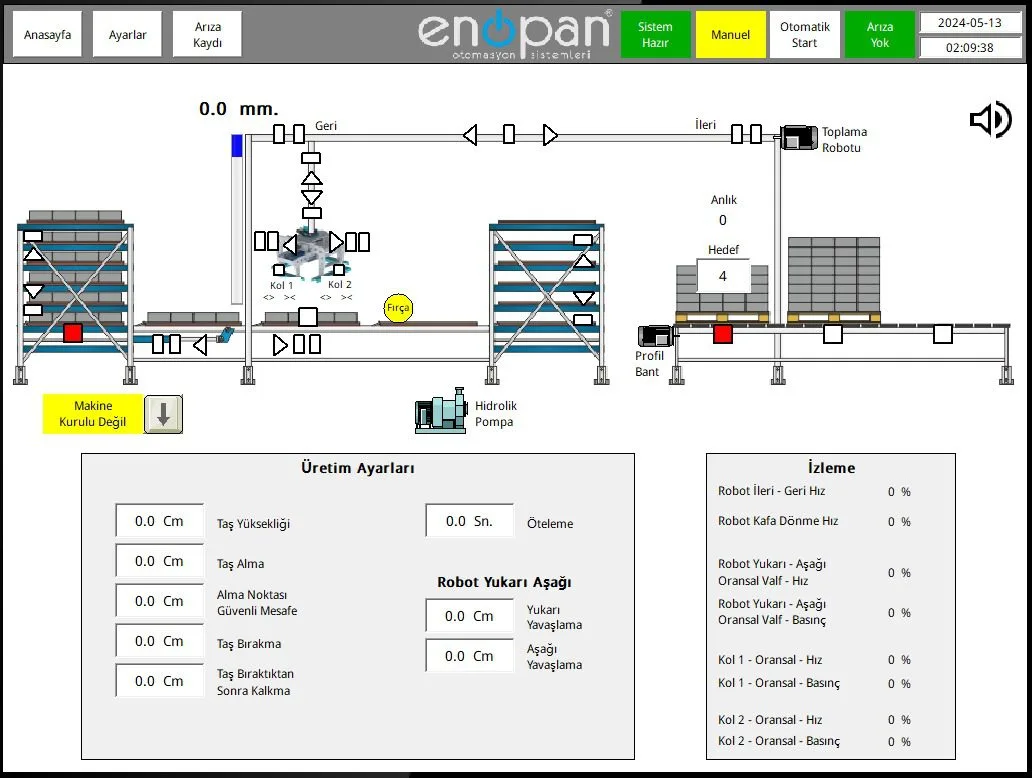
How are settings and production data handled?
Operator settings are reviewed alongside how the existing system stores them. Where recipes or product selections are used, identify what information is saved, who can change it and what will transfer to the new system. Existing operation provides the basis rather than using the same parameter list for every machine.
Production counters, process status and alarm history also represent separate needs. Check whether a number displayed on screen has a historical record. If the business needs to review past production, recording and reporting should be described separately from screen renewal.
Why are panels and field connections examined?
PLC and HMI software operate with field sensors and controls. Connections are assessed using existing drawings, device labels and panel photographs. This shows how the field supplies a signal expected by the software or which equipment receives a command.
Without a program backup, a scope for new software can be developed from the machine’s operating sequence and available documents. Assessment and testing needs are then defined accordingly. State any missing drawings or backups clearly when sharing the request.
Which functions are checked after implementation?
Commissioning checks cover feeding, production and handling steps, manual commands, automatic transitions and defined alarms. Settings and operating modes used by operators are also tested for the expected response. Tests are prepared around the machine’s equipment and agreed changes.
At Enopan, we assess control software, operator screens and panel work together for concrete paver, block and kerb machines. Handover includes PLC/HMI backups, electrical drawings, an operating manual and operator training. For work during production, we discuss the downtime that can be planned at the outset.
Share the step you want to change on your machine
State the current operating sequence, PLC/HMI models and upgrade expectations. We can scope software, screens, panels and on-site commissioning together.