

The differences between current status, alarm history and production reports, and the questions to clarify at the start of a project for phone or computer access.
When defining SCADA requirements, the first question is what information you want to see, rather than which screen to have. Current plant status, past alarms and production totals for a period are different data needs. The monitoring and reporting scope is prepared by considering the available field data alongside these operational questions.
What plant conditions can a live status screen show?
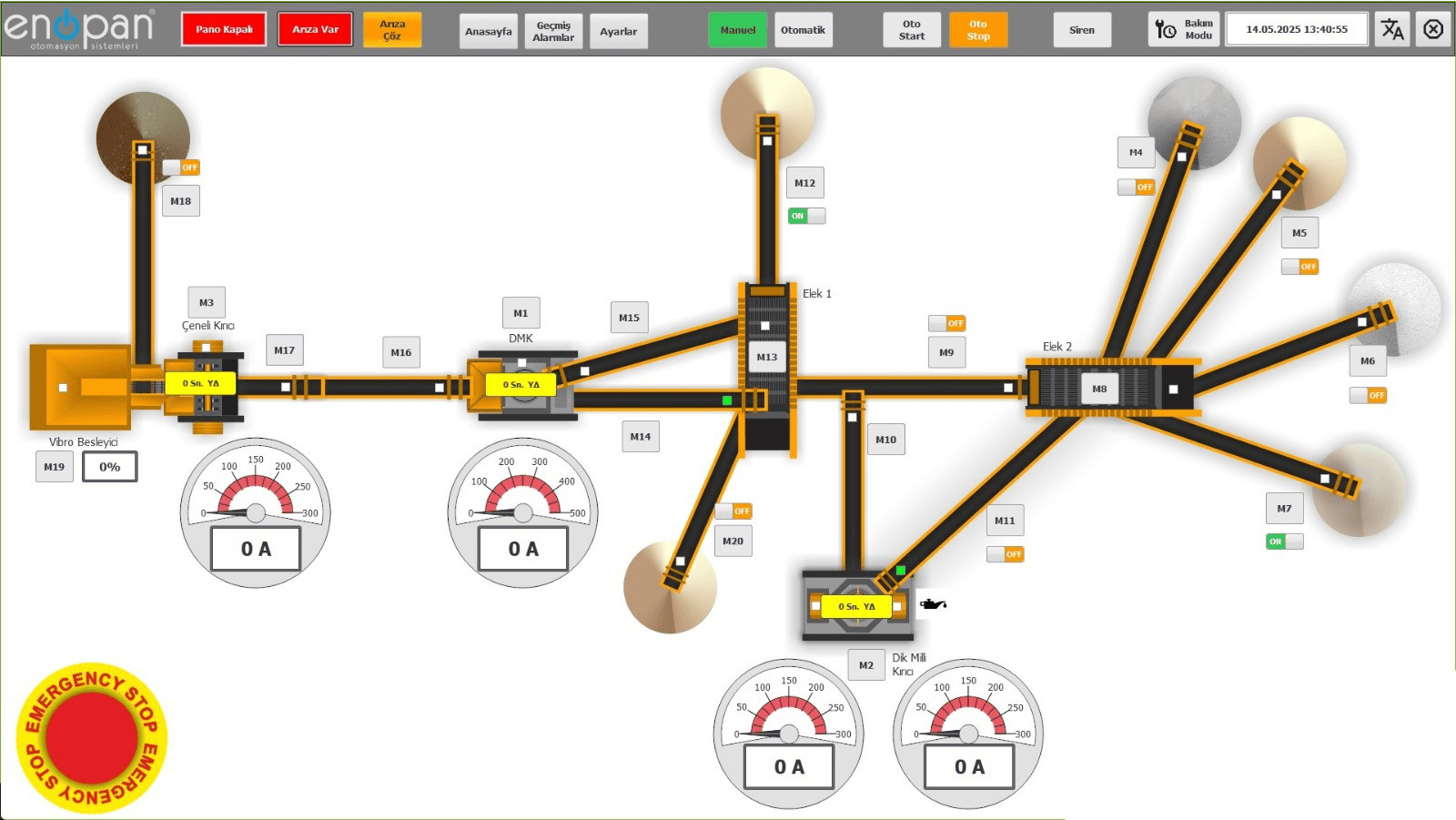
Equipment running or stopped status, operator commands, alarm information and measured values can be brought together on the plant screen. The information displayed depends on the signals available from the PLC or other field devices. The equipment and data points to be monitored are therefore identified before screens are prepared.
Viewing a conveyor's status and monitoring the quantity passing through a production line may use different data sources. For example, when considering instantaneous readings and accumulated totals from a belt scale, the measurement information and its recording arrangements are assessed together. The operator's screen is shaped by the data the plant actually provides and the operating sequence.
Current status, alarm history and production reports answer different questions
A live screen answers the question of what is happening now. An alarm record is used to examine when a defined event occurred and which equipment it involved. A production report presents records for a selected time range in a format the business can use. Describing these three needs separately clarifies which information will only be displayed and which will be stored.
Displaying a value on screen and recording its history require separate configuration. Data needed for historical reports, the recording period and the fields to display are discussed at the start of the project. This keeps the scope of live operator information distinct from records to be reviewed later.
| Operational question | Relevant information |
|---|---|
| What is the line's current status? | Equipment status, active alarms and live measurements |
| When did a particular event occur? | Alarm record with a timestamp and associated equipment |
| How much was produced during the selected period? | Quantity and production records for the defined period |
| In what format will this information be shared? | A screen and Excel/PDF report prepared for the requirement |
Start by explaining how the report will be used
To expand on a request for a production report, explain who will use it, for which period and to compare which information. Periods such as a day, shift or selected date range can be considered alongside fields such as equipment, product or process details. How these fields will be obtained from existing records is determined separately.
Enopan can prepare flexible report layouts and Excel/PDF outputs according to the business's needs. Bringing an existing report example to the project discussion helps explain how columns and totals should be presented. Agreeing on the meaning of dates, quantities and equipment details in the report is important for making the output useful in daily work.
Decide what you want to do through phone or computer access
A remote access request should explain whether you want to view plant status, access reports or perform specific control operations. Monitoring, plant control and report access from a mobile phone or computer can be prepared according to the project scope. The equipment and commands included in access are considered alongside the operating sequence.
Where the customer provides an internet connection, access can be established through the customer's computer or remote access devices. An operator's remote monitoring requirement and a technical team's service connection serve different purposes; their uses are described separately during the discussion. This gives screen access and the control or support work a clearly defined scope.
Plan alarm notifications and alarm records together
Displaying an alarm, searching for it in historical records and notifying the relevant person are separate requirements. The project discussion defines which events matter, who should receive notifications and what information the record should contain. The equipment name and a clear event description help the recipient understand the situation reported.
Devices that send SMS messages can be used for SMS notifications. Email sending can be configured through the SCADA or HMI system's own interface settings. The method and settings are assessed together with the existing system. Including notifications in the same initial list as report and screen requirements allows the scope of work to be discussed as a whole.
Start your SCADA discussion with a data list
Instead of drawing every screen detail in advance, write down the information you want to monitor and why you use it. Existing PLC/HMI details, example screenshots and reports in use can be added to this list. The data points, recording needs and access scope are then clarified together using this information.
- Equipment to monitor and live values to display
- Alarms to record and notification needs for the relevant people
- Reporting period, required columns and expected Excel/PDF outputs
- Phone/computer monitoring, control and report access requests
- Existing control system and the internet connection the customer can provide
Let's identify the data you want to see
Explore the SCADA and remote plant monitoring service for your current plant status, alarm and production reporting needs.