


A preparation guide bringing together equipment, operating sequence and existing system details to explain your new installation or upgrade request.
The scope of an automation quotation can be defined once the machine's or plant's intended operation is clearly described. An equipment list, operating sequence and information about the existing control system form the basis of the first discussion. Although information for a new installation and an existing system upgrade falls under the same headings, the details differ.
Start by describing the work required
Begin your request with the name of the plant or machine and explain the work you need support with. Installing a new control system, changing existing PLC software, updating operator interfaces, upgrading a control panel and accessing production reports are different scopes of work. If several are needed, you can include them in the same request.
If you want to change an existing system, explain the difference between current and expected operation. Which step will change, what equipment will be added, and what information does the operator want to see? A short, specific description provides more project information than simply saying that the automation will be upgraded. You can put the priority need first. State at the outset whether the work covers a single machine or an interconnected line.
List equipment together with its function
Listing motors, conveyors, feeders, valves and measuring devices by function makes the operating sequence easier to understand. Where available, include device label details and the names used in the electrical diagrams. Distinguishing new equipment from equipment that will remain in use makes the boundaries of the change clear.
The list need not consist of quantities alone. You can also describe which equipment a feeder supplies, when a conveyor starts in the sequence or where a measurement is used on screen. This information shows how the machine's operation relates to the control system; the details are clarified during the initial review.
| Information category | Details to share |
|---|---|
| Plant or machine | Function, location and mode of operation |
| Equipment | Name, function, existing/new status and a label photograph if available |
| Control system | Make/model details for the PLC, HMI and other control components |
| Change | Current situation, required new operation and priority |
| Documents | Control panel photographs, diagrams, operating documents and existing program backups |
Write the operating sequence as the operator describes it
It helps to describe the main steps in order, from the start command to a normal stop. Explain which equipment runs first, the condition that starts the next step and where the operator intervenes. If expected behaviour differs between automatic and manual operation, state that difference too.
For a plant using recipes, target quantities or setpoints, you can explain what the operator enters and what result completes the operation. Existing alarm messages and screenshots showing the event can also help explain the request. This information describes the operating steps to be controlled; customers are not expected to prepare program details in advance.
Identify the system each photograph and document belongs to
An overview of the control panel, control device labels and existing operator screens helps with the initial review. If there are several panels or machines, matching files to their names reduces confusion. It is also useful to state which machine the documents belong to and whether they were prepared before or after the latest changes.
If program backups are available, identify the machine associated with each PLC and HMI file. For a system without backups, examining the machine's operating sequence and developing software anew can be considered as a scope of work. Electrical diagrams and operating documents are separate information sources that support this review.
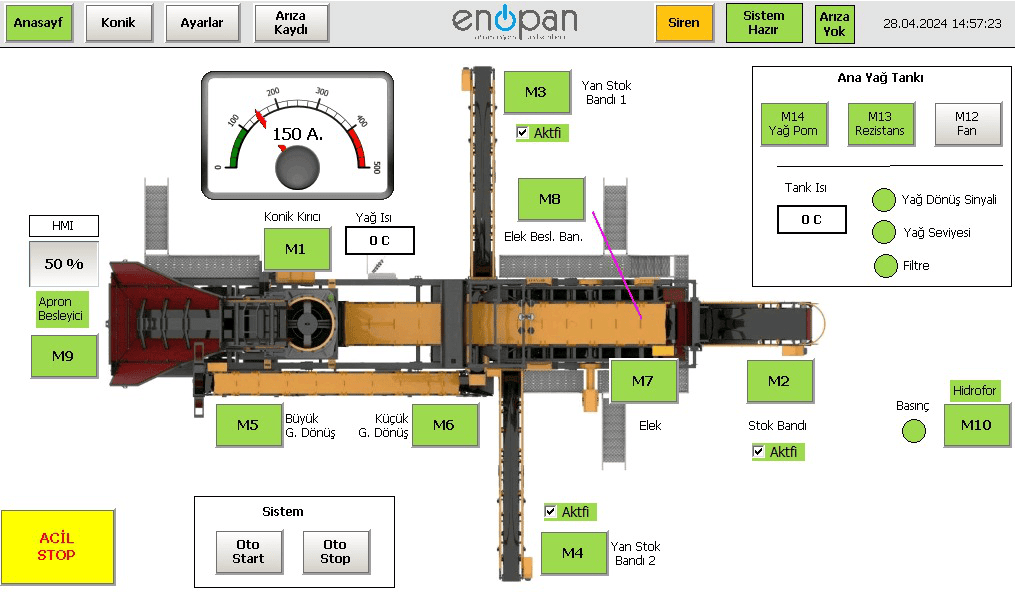
Include site conditions and handover expectations
Share the plant location, equipment layout on site and the production shutdown that can be scheduled for commissioning. Connections between a new control panel and existing field equipment, or coordinated operation of machines in different areas, may affect the scope. Known site conditions can be included in the technical assessment when stated at the outset.
List expectations such as HMI screens, production records, remote monitoring and report outputs separately. Where remote service and access are envisaged, the customer's internet connection is also assessed. Program backups, electrical diagrams, an operating manual and operator training are standard handover items in Enopan projects; other project deliverables are clarified during the discussion.
Use these four headings for your first message
Collecting the information in one short file or a well-organised message is enough to get started. Add the available information under each heading and match photographs and documents you can share to the relevant machine. This framework provides a basis for discussing the points that need clarification in the first meeting.
- Work: plant or machine, new installation or upgrade requirement
- Operation: current sequence, requested change and equipment list
- System: PLC/HMI details, control panel photographs, diagrams and available backups
- Site and handover: location, planned shutdown availability, screen/report/access expectations
Let's define the scope of your project together
Before sharing your equipment details and required operating sequence, you can explore the PLC and HMI software service.